A weekend project: no paid apps, no bank access for any AI, and one message a night.
TL;DR
- Bank alert emails are forwarded to one Gmail account and auto-labelled.
- A Google Apps Script parses them into a Google Sheet every hour.
- A Telegram bot sends me daily, weekly and monthly totals, and answers commands like
/weekon demand. - Optional: ask questions in plain English, answered by Claude.
- I didn’t write the script by hand. Claude built it with me over a few chat sessions.
- Cost to run: $0. The optional Claude questions use the API, which is billed per use.
- My banking credentials never touch a script, an app or an AI.
Part 1: Why I built it
This started as a weekend experiment in getting more out of my personal Claude subscription. I wanted a project that was useful in daily life, not another demo, so I asked Claude to build it with me.
The question that kept nagging me was simple: how much am I actually paying out through PayLah and PayNow? Card statements give you a tidy monthly view. Wallet payments and PayNow transfers don’t land in one place the same way.
I set three constraints:
- No paid apps. There are plenty of expense trackers, but I didn’t want another subscription to find out where my money goes.
- No AI access to my banking. I’m happy to use AI on my own data, but I’m not giving any model, or any third-party app, a login to my bank.
- Easy summaries. I want a number at the end of the day without opening anything. Telegram is free and takes minutes to set up as a delivery channel.
Why email forwarding is a good middle ground
Banks already send transaction alerts. In my case they contain the amount, merchant, date and the last four digits of the card or account. No passwords, no full account numbers.
That makes the alert email a good trade: it carries exactly the data I need and nothing I can’t afford to expose. It’s still personal data, so I treat the Gmail account and the Sheet as sensitive, but a breach of either wouldn’t let anyone log in to my bank or move money.
Part 2: How I built it with Claude
I didn’t write the script by hand. Claude wrote it, through chat, and I steered. It went roughly like this:
- Start from the goal, not the code. I wanted one honest daily number for what I actually spend across my UOB cards, PayLah and PayNow. I’d looked at a native Apple setup first (Wallet, Shortcuts, Numbers) before moving to Google Sheets with email forwarding.
- Work from real alerts. The parsers match the actual wording of my bank emails, so Claude worked from real alert formats (with personal details stripped), not guesses.
- Grow it one feature at a time. The first version just parsed PayLah, UOB card and UOB PayNow alerts into a Sheet. Then I asked for a Mon–Sun weekly view with future days marked pending, then a month view, then yesterday’s transactions on demand, then free-form questions.
- Review before publishing. Before putting it on GitHub, I had Claude review the script, scrub personal details from the code comments, and write the README, licence, GIF and diagram. The review caught a diagnostic function that logged my token length and chat ID, which I fixed before publishing.
The subscription did the building. The tracker itself costs nothing to run.
One caution: Apps Script asks for permission to read your Gmail. If AI wrote your script, read it before you authorise it.
Part 3: Architecture
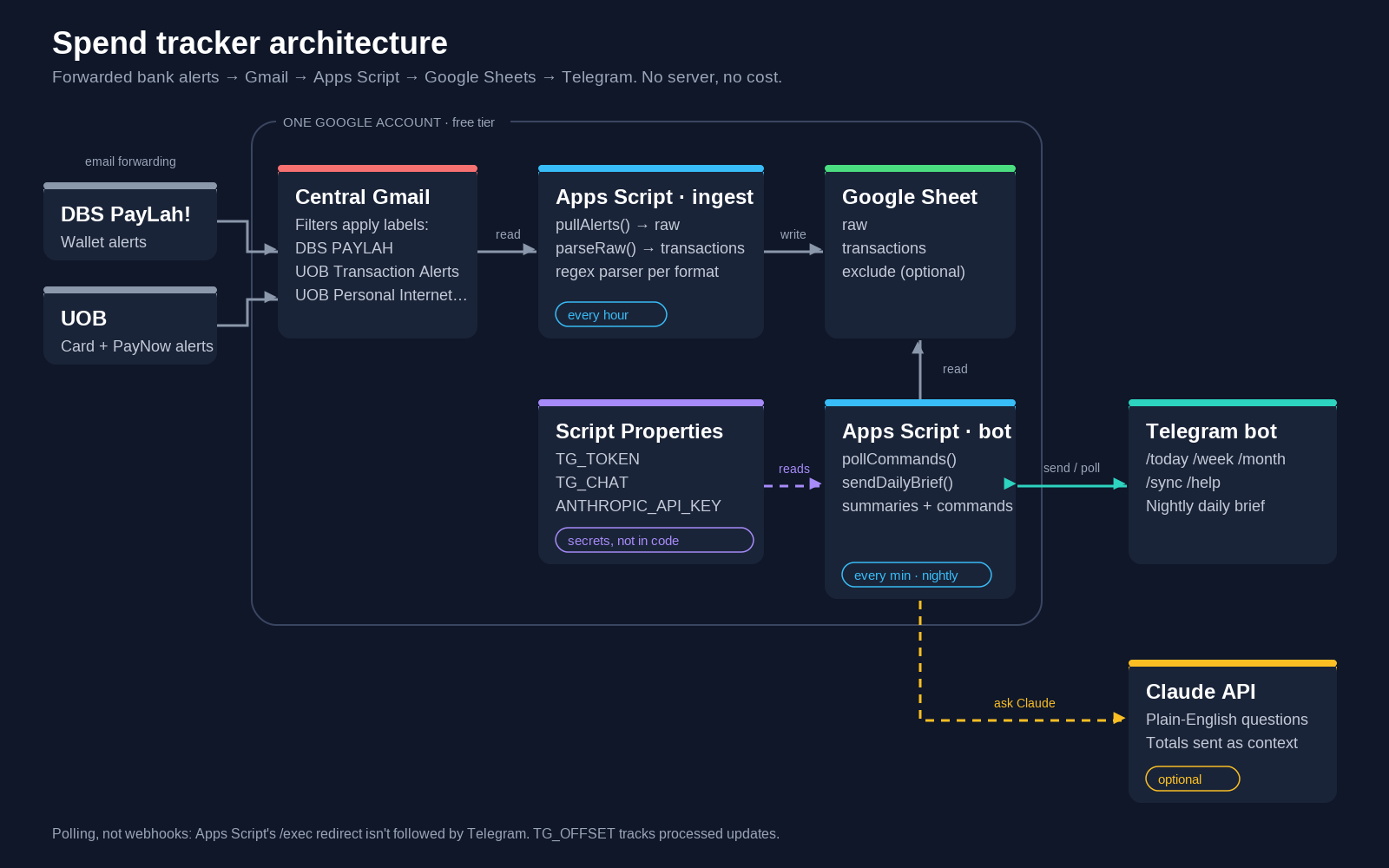
Everything runs inside one Google account:
- Gmail receives the forwarded alerts. Filters apply one label per alert type.
- Apps Script (ingest) runs hourly: it reads new labelled emails into a
rawtab, then parses them into atransactionstab. - Google Sheets is the database. Three tabs:
raw,transactions, and an optionalexclude. - Apps Script (bot) polls Telegram every minute for commands and sends a nightly brief.
- Script Properties hold the secrets, so nothing sensitive is ever in the code.
Three design choices keep it simple and reliable:
rawis the source of truth. The original email body is stored first, then parsed. If I fix a parser, I can reprocess without re-fetching anything.- Everything is deduplicated by Gmail message ID, so the hourly run is safe to repeat.
- Polling, not webhooks. Apps Script’s web app URL answers with a redirect that Telegram’s webhook client won’t follow, so the script asks Telegram for new messages every minute instead.
Part 4: Capturing the alerts
- Forward your bank alert emails to one central Gmail account.
- In that account, create a filter per alert type that applies a label:
DBS PAYLAHUOB Transaction AlertsUOB Personal Internet Banking Notification Alerts
- Create a Sheet in the same account with tabs
rawandtransactions(headers must match what the script expects, it checks them on every run).
The script reads by label, so nothing else in the inbox is ever touched.
Part 5: Turning emails into rows
Each alert format gets its own small regex parser. A UOB card alert looks like this:
A transaction of SGD 12.34 was made with your UOB Card ending 1234 on 01/01/26 at MERCHANT.and the parser pulls out the pieces:
/A transaction of ([A-Z]{3})\s*([\d,]+\.\d{2}) was made with your (.+?) ending (\d{4}) on (\d{2})\/(\d{2})\/(\d{2}) at (.+?)(?:\.\s*If unauthorised|\.\s*$)/s;That becomes one row: date, amount, currency, merchant, last four digits, and a type (card, wallet, paynow).
I support four formats today:
| Source | Format |
|---|---|
| DBS PayLah! | Wallet payment |
| UOB | Card transaction |
| UOB | PayNow transfer with amount |
| UOB | PayNow transfer with no amount |
That last one matters. Some PayNow confirmations don’t include the amount. Rather than drop them, the script records them with a blank amount and flags them in the daily message, so the gap is visible instead of silently lowering my total.
Everything counts as spend, PayNow transfers included. For me the goal is one honest daily number, not category analysis.
Part 6: The Telegram bot
Create a bot with @BotFather, put the token and your chat ID in Script Properties, and add two triggers:
pollCommands: every minutesendDailyBrief: nightly
Commands:
| Command | What you get |
|---|---|
/today, /yesterday | Total plus the biggest transactions |
/week | Mon–Sun daily totals, future days marked pending |
/month, /lastmonth | Per-day breakdown and daily average |
/sync | Pull and parse new emails right now |
A typical nightly message (values masked here):
Today: $2•.94  (3 txns)
 1•.09  SMP*DA••• FUS••• CUI•••
 1•.09  SMP*WE• ZHA•• LAO MI•••
 2.•6   BUS/MRT

This week
Mon   $1•.21
Tue   $3•••.41
Wed   $1•.84
Thu   $7•.29
Fri   $2•.94  (so far)
Sat   pending
Sun   pending
Total  $3•08.69
Part 7: Asking Claude questions (optional)
Any message that isn’t a command goes to Claude, if you’ve added an API key. The script sends the current month’s totals, daily totals, top merchants and transaction rows, and tells the model to use the precomputed totals exactly and never recalculate them. That keeps answers consistent with /month, instead of the model doing its own arithmetic.
Be clear on the trade-off. This is the one place transaction data (merchant, amount, last four digits) leaves Google for an AI provider. It’s opt-in: with no API key set, nothing is sent. The API is billed per use and separate from a Claude subscription.
Part 8: Security model
- Secrets live in Script Properties, never in the code. That’s what makes the repo safe to publish.
- The bot only answers my chat. Messages from any other chat are ignored without a reply. (The check is on the chat ID, so keep the bot in a private chat, not a group.)
- No bank login anywhere. The script only ever sees alert emails.
- Know what’s not protected. Anyone with edit access to the Sheet or script can read the Script Properties. And bot messages on Telegram aren’t end-to-end encrypted, so the totals travel through Telegram’s servers.
Part 9: What went wrong, and what I’d fix next
- Parse failures are silent. An unrecognised alert is only logged, so totals can come out low. Next: write failures to a tab and warn on Telegram.
- Duplicates. UOB alerts have no transaction reference, so a re-forwarded email looks identical to a real repeat charge. The script flags possible duplicates in the log rather than merging, because two identical charges in a day can be legitimate.
- Double counting. Paying off a card by PayNow counts on top of the card spend. The optional
excludetab handles this, but only if you remember to use it. - Non-SGD is ignored. Overseas spend doesn’t appear in totals yet.
- The hourly scan won’t scale forever. It re-reads up to 500 threads per label. Adding a
newer_than:filter to normal runs fixes that.
Try it
The full script is around 700 lines of Apps Script, with a README covering setup step by step. The code is on GitHub: lanbau/spend-tracker.
Fork it, change the labels and regexes to match your own bank’s alerts, and you have a private, free spending tracker in an evening.